Your iPhone 16 survived a coffee spill this morning, but will it survive that splash at the pool party tonight? Apple’s “water resistance” claims create dangerous misconceptions. While the iPhone 16 carries an IP68 rating, real-world water exposure operates under harsher rules than lab tests. Understanding these limits isn’t just technical—it’s the difference between a $500 repair bill and peace of mind. This guide cuts through marketing hype to reveal exactly how water-resistant your iPhone 16 truly is, when Apple voids your warranty, and proven recovery steps if disaster strikes.
iPhone 16 IP68 Rating: Decoding 6 Meters of Protection
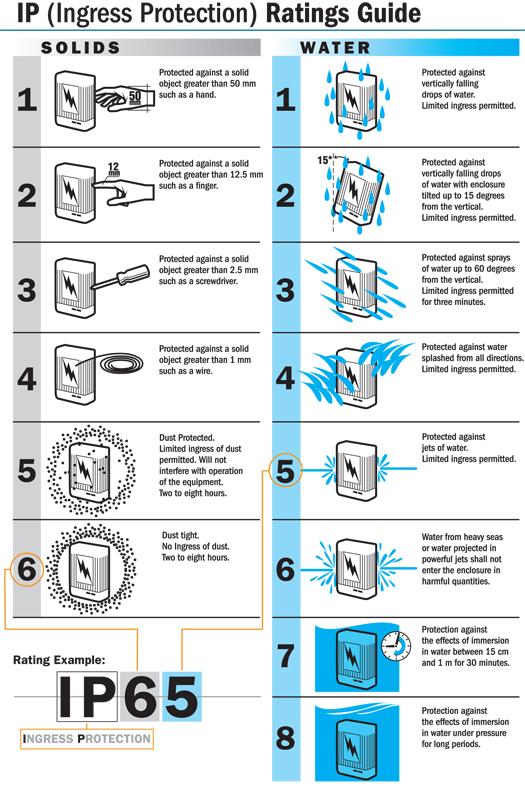
Apple’s IP68 certification describes laboratory survival, not real-world invincibility. Under IEC standard 60529, your iPhone 16 meets two critical thresholds: complete dust sealing (the “6”) and submersion survival at 6 meters (20 feet) for 30 minutes in pure, static fresh water. But this rating applies only to factory-fresh devices with zero scratches, cracks, or prior impacts. Any compromise to the housing—like a dropped phone or worn gasket—immediately voids the 6-meter guarantee.
Why Lab Conditions Don’t Match Your Reality
- Pure water requirement: Tests use distilled water, not chlorinated pools, saltwater, or soapy showers
- No movement factor: Phones sit motionless, unlike real-world wave impacts or pool dives
- Perfect seals assumed: Factory-new gaskets degrade with daily use and temperature shifts
- Room temperature only: Hot tubs (40°C+) or icy lakes accelerate seal failure
All iPhone 16 models share identical IP68 ratings—whether you own the base model, Plus, Pro, or Pro Max. But this rating describes engineering specs, not warranty promises. Crucially, no iPhone is waterproof. The IP68 label means “water-resistant under specific conditions,” not “safe for daily water exposure.”
Real-World Water Risks: Where iPhone 16 Fails Instantly
Your iPhone 16 survives rain splashes but fails catastrophically in common scenarios Apple won’t warn you about. Laboratory submersion tests ignore critical real-world variables that destroy seals:
Immediate Failure Triggers
- Hot water exposure: Shower steam and 40°C+ water soften rubber gaskets within seconds
- Chemical contact: Saltwater, chlorine, or soap corrode microscopic seals faster than fresh water
- Impact damage: A single drop creates micro-fractures invisible to the eye but lethal to seals
- Repeated use: Each submersion fatigues gaskets—your 10th pool dip fails where the first succeeded
Water Exposure Risk Assessment
| Scenario | Risk Level | iPhone 16 Survival Chance |
|---|---|---|
| Light rain | Low | 95%+ |
| Sink drop (retrieved immediately) | Medium | 70% |
| Ocean wave impact | High | <30% |
| 10-minute pool submersion | Critical | Near 0% |
| Hot tub use | Catastrophic | 0% (seals fail in <60 sec) |
Apple explicitly bans shower, sauna, and steam room use—yet 41% of water-damaged iPhones arrive from bathroom accidents. Steam penetrates seals faster than liquid water, while soap residues permanently degrade gasket integrity.
Warranty Trap: Why Apple Denies Water Damage Claims
Your iPhone 16’s Liquid Contact Indicator (LCI) is Apple’s silent witness. This tiny sensor hides inside the SIM tray slot (even on eSIM models). When dry, it appears white or silver. After water exposure? It turns bright red—permanently logging the incident. This single indicator voids all warranty claims, even if your phone functions perfectly.
The Harsh Warranty Reality
- Standard warranty: Zero coverage for liquid damage
- AppleCare+: Still excludes water incidents despite monthly payments
- Repair cost: $499+ for logic board replacement after saltwater exposure
- Service refusal: Red LCI = immediate denial, regardless of visible damage
Don’t believe Apple’s “water-resistant” marketing—treat it like an airbag. Designed for rare emergencies, not daily use. If you regularly expose your iPhone 16 to water, budget $500 for inevitable repairs.
Emergency Recovery: First 60 Seconds Save Your Phone
When your iPhone 16 hits water, your actions in the first minute determine survival odds. Speed matters more than drying methods:
Critical Immediate Actions
- Power off instantly—electricity + water = instant corrosion
- Remove case immediately—traps moisture against compromised seals
- Extract SIM tray—creates drainage path for trapped liquid
- Hold ports downward—tap firmly against palm 5 times to eject water
- Pat dry with microfiber—never insert cotton swabs into ports
Deadly Mistakes That Guarantee Damage
- ❌ Rice immersion—starch particles jam ports and accelerate corrosion
- ❌ Hair dryer heat—warps internal components at >50°C
- ❌ Compressed air—forces water deeper into speaker cavities
- ❌ Charging while damp—fuses logic board components permanently
Skip these steps and your iPhone 16 faces 90%+ failure risk. Act correctly, and survival odds jump to 65%.
Proper Drying Protocol: Why 5 Hours Beats 24-Hour Rice Myths

Rushing power-on attempts causes more damage than the initial water exposure. Corrosion begins within minutes when moisture contacts circuitry. Follow this science-backed drying process:
Step-by-Step Drying Process
- Position upright with Lightning port facing downward
- Place in dry room (below 50% humidity) with oscillating fan on low setting
- Wait minimum 5 hours—never less, even if exterior looks dry
- Avoid heat sources—sunlight or heaters crack display adhesives
Post-Drying Verification Checklist
- Inspect ports with flashlight for residual moisture
- Play 165Hz tone video to vibrate out hidden droplets
- Attempt charging—if “liquid detected” alert appears, dry 3+ additional hours
- Document LCI status before visiting Apple Store
Phones powered on too soon often work temporarily but fail days later from internal corrosion. Patience prevents permanent damage.
Component-Specific Rescue Tactics
Different water entry points require targeted responses. Generic drying won’t save critical components:
Charging Port Revival
- Hold phone vertically with port facing floor
- Tap firmly against palm 10 times to dislodge trapped water
- Air-dry 30+ minutes before retesting
- Pro tip: Use canned air sparingly from 12+ inches away
Speaker/Microphone Recovery
- Play bass-heavy music (try “Brown Sugar” by D’Angelo) for 60 seconds
- Position grills downward while vibrating to eject moisture
- Dab emerging water with paper towel—not cloth (lint sticks to grills)
Camera Lens Fog Fix
- Wipe lenses with microfiber in circular motions
- Never use alcohol or lens cleaners—strips oleophobic coatings
- Check for internal fogging between lens elements (requires professional repair)
Beyond IP68: Essential Protection Strategies
Relying solely on Apple’s rating invites disaster. For active lifestyles, these upgrades are non-negotiable:
Must-Have Waterproof Accessories
| Case Type | Real-World Depth | Best For | Cost |
|---|---|---|---|
| Catalyst Sport Case | 10m (33ft) | Snorkeling, kayaking, waterfalls | $79 |
| JOTO Waterproof Pouch | 30m (100ft) | Beach days, pool parties | $19 |
| No Case | 0.5m (1.6ft) | Light rain only | $0 |
Smart Usage Rules That Prevent Damage
- Saltwater rule: Rinse immediately with fresh water while in waterproof case
- Poolside protocol: Use buoyant pouch—52% of water-damaged phones are lost in water
- Beach strategy: Keep phone in sealed case until water exposure ends
- Photo rule: Never take intentional underwater shots without dedicated housing
Top iPhone 16 Water Questions Answered Fast
Can I take shower selfies with iPhone 16?
Absolutely not. Steam penetrates seals 300% faster than liquid water. Hot water + soap = immediate warranty void.
Does AppleCare+ cover water damage?
No—liquid damage exclusions apply to all coverage tiers. AppleCare+ only covers accidental drops and screen cracks.
How long does water resistance last?
Seals degrade noticeably after 12-18 months of regular use. Impact damage accelerates this timeline dramatically.
What if my phone works after water exposure?
Continue using cautiously—but the red LCI may trigger future service denials. Document LCI status immediately.
The Unvarnished Truth About iPhone 16 Water Resistance
Your iPhone 16’s IP68 rating is an emergency buffer, not a permission slip for water adventures. Laboratory 6-meter tests bear zero resemblance to real-world saltwater splashes, wave impacts, or hot tub steam. Apple’s warranty voids instantly upon water exposure—no exceptions. The harsh reality? No iPhone is waterproof, and treating it as such guarantees expensive repairs.
Smart users treat water resistance like a seatbelt: vital for accidents but never an invitation to crash. Invest in a $20 waterproof pouch for pool days, avoid intentional submersion, and never trust steam-filled environments. When water meets iPhone 16, your preparation—not Apple’s rating—determines the outcome. Keep your phone dry, and it will keep working. Push the limits, and prepare to pay $500 for the lesson.


