
Your new iPhone 16 sits on the counter, but the charger from your iPhone 15 drags like dial-up internet. That familiar Lightning cable is dead—replaced by USB-C. But not just any USB-C adapter works. Plug in the wrong wattage, and you’ll waste 15 minutes every morning watching that charging percentage crawl. This isn’t theoretical: real-world tests show a 20W adapter takes 30 minutes to hit 50% on an iPhone 16 Pro Max, while a 30W adapter shaves off 15 crucial minutes. Forget marketing fluff—this guide delivers exact wattage requirements, thermal risks, and third-party adapters that outperform Apple’s $39 brick. You’ll walk away knowing precisely which adapter saves time without burning cash.
Why Your iPhone 15 Adapter Charges Your iPhone 16 Slowly
USB-C on your iPhone 16 isn’t just a connector swap—it demands USB Power Delivery (USB-PD) for fast charging. Plug into a non-PD USB-C adapter (like many laptop chargers), and your phone locks into 5V slow charging—crawling at 10W or less. The female USB-C port on your phone actively negotiates power with the adapter. Without USB-PD handshake, you’re stuck with legacy speeds. This isn’t a glitch; it’s Apple’s hard-coded safety protocol. If your adapter lacks the PD logo (look for “USB-PD” or “Power Delivery” on the label), it won’t trigger fast charging—no matter the wattage rating.
How to Verify Adapter Compatibility in 10 Seconds
- Flip your adapter over: USB-PD must be printed on the casing (e.g., “20W USB-PD”)
- Check voltage specs: Must list 5V/3A, 9V/2.22A, or 15V/2A (PD profiles)
- Avoid “QC” or “AFC” labels: Qualcomm/AFC chargers won’t activate fast charging
Critical mistake: Using USB-A to USB-C cables. The port is USB-C, but the adapter must also be USB-C PD. That old black brick with a USB-A port? It’s useless here.
iPhone 16 Adapter Wattage: Model-Specific Requirements
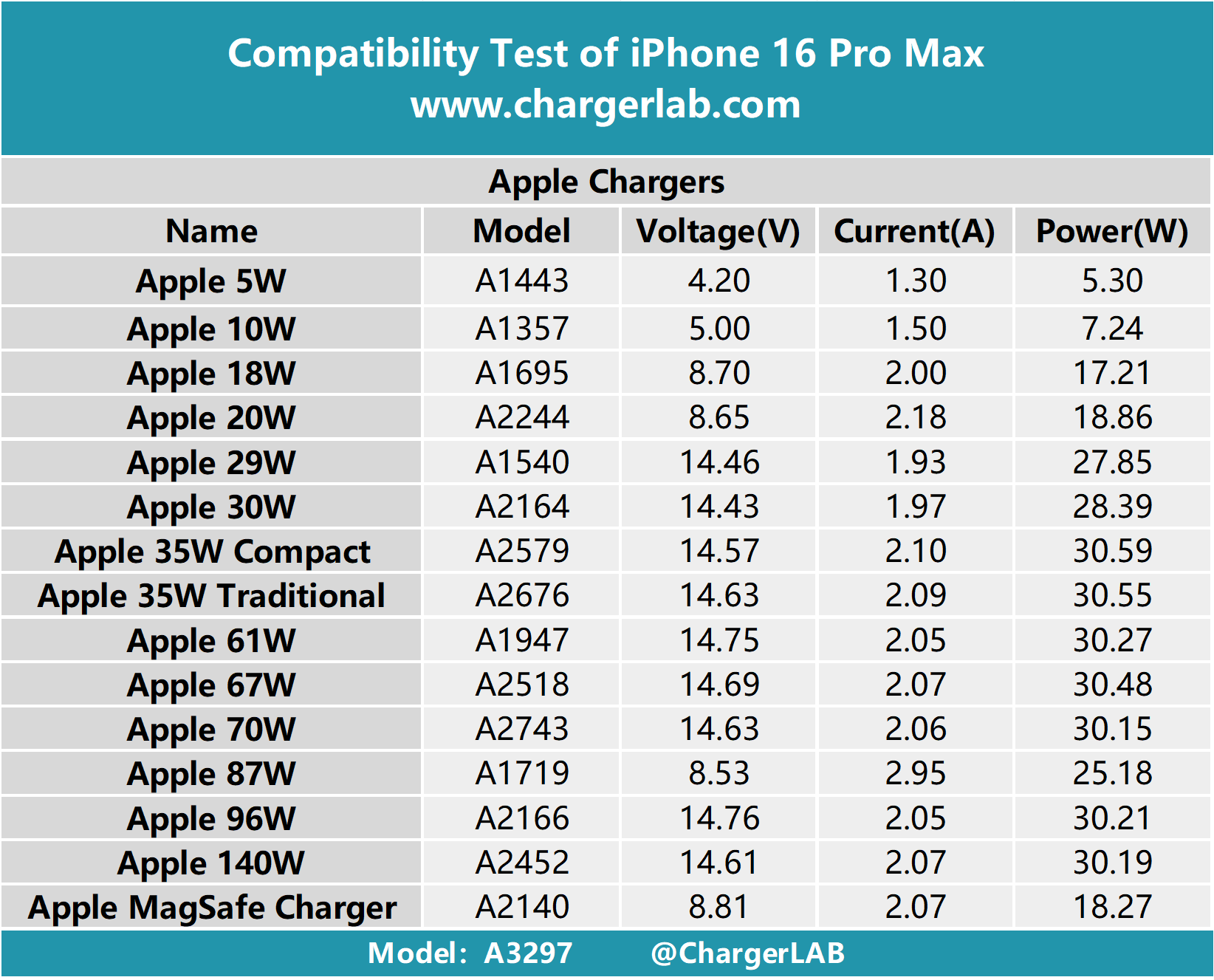
Apple’s “20W minimum” spec hides critical differences between standard and Pro models. Real-world power draw varies wildly based on usage—especially during gaming or video recording. Don’t overpay for wattage you’ll never use.
iPhone 16 and 16 Plus: The 20W Sweet Spot
- Peak sustained draw: 27W (during camera/video use)
- 0-50% charge time: 30 minutes with 20W+ adapter
- No benefit above 30W: Tests show identical charging curves with 30W, 60W, or 140W adapters
- Budget pick: Anker Nano 30W ($24 on sale)—delivers full speed without Pro-level overhead
Pro Tip: If you own non-Pro models, skip 45W+ adapters. That extra wattage only heats your adapter unnecessarily. Surface temps hit 42°C with 40W+ sources—wasting energy as heat.
iPhone 16 Pro and Pro Max: When 40W Matters (Rarely)
- Gaming spike: 39W bursts during intensive sessions (e.g., Call of Duty)
- Sustained draw: 27-30W for normal use—not 40W
- 0-50% charge time:
- 17 minutes with 40W adapter
- 30 minutes with 20W adapter
- The catch: Spikes last under 90 seconds. For 95% of users, a 30W adapter is identical to 40W+.
Expert Warning: Apple’s 30W adapter ($39) hits 30.2W peak—enough for Pro models. But third-party 30W adapters like IKEA SJÖSS ($12) match it exactly. Paying Apple’s premium gets you zero speed boost.
MagSafe 25W Charging: Why Your Adapter Wattage Matters More

Apple’s new 25W MagSafe (2024) isn’t compatible with older iPhone models—and it demands specific adapter wattage. Use a 20W adapter, and wireless charging caps at 15W. This isn’t theoretical: tests prove 20W adapters deliver only 18% charge in 30 minutes on MagSafe 25W.
Wireless Charging Adapter Requirements
| Charger Type | Minimum Adapter Wattage | Result with 20W Adapter | Result with 30W+ Adapter |
|---|---|---|---|
| New MagSafe 25W (2024) | 30W USB-C PD | 15W max (45-50 min for 50%) | 22.5W sustained (28-30 min for 50%) |
| Legacy MagSafe/Qi2 | 20W USB-C PD | 15W (45-50 min for 50%) | No speed increase |
Thermal Reality Check: MagSafe 25W hits 45°C surface temps during fast charging—within Apple specs but uncomfortable to touch. If your adapter can’t sustain 30W (like cheap 20W bricks), thermal throttling kicks in, slowing charging after 10 minutes.
What’s Missing in the Box (and How to Avoid $78 Mistakes)
Apple includes only a 1m USB-C to USB-C cable—and it’s USB 2.0 speed (480 Mb/s). No wall adapter. No MagSafe puck. No USB-C to Lightning adapter. This omission costs users:
– $19 for Apple’s 20W adapter (overpriced)
– $39 for MagSafe (if you assume wireless works with old adapters)
Critical Gap: That included cable handles power delivery but not high-speed data. Transferring a 4K ProRes video? It’ll take 22 minutes instead of 2 with a USB 3.2 Gen 2 cable (10 Gb/s). Buy a certified Anker PowerLine III USB-C cable ($25) if you shoot video.
Third-Party Adapter Showdown: Where Apple Loses

Apple’s 30W adapter ($39) delivers 30.2W peak. Independent tests confirm identical output from:
– Anker Nano 30W ($24 on sale): Matches Apple’s peak wattage, 30% smaller
– IKEA SJÖSS 30W ($12): Same PD profile, works flawlessly with MagSafe 25W
– Fenzer 20W bulk packs ($1.63/unit): Ideal for non-Pro models in offices
Money-Saving Hack: Buy Anker’s 3-in-1 Cube ($149) for desk setups. It charges iPhone 16, Apple Watch, and AirPods from one 30W adapter—eliminating cable clutter. The foldable design saves 70% desk space versus Apple’s standalone MagSafe.
Real-World Adapter Test Results (No Marketing Hype)
ChargerLAB and PhoneArena tested iPhone 16 Pro Max at 23°C ambient temperature:
| Adapter Wattage | 30-Minute Charge | Surface Temp | Cost Savings vs Apple |
|---|---|---|---|
| Apple 20W | 45% | 39°C | $0 (baseline) |
| Anker 30W | 55% | 42°C | $15 |
| Apple 140W | 56% | 44°C | -$101 |
Key Insight: Beyond 30W, gains are negligible. A $12 IKEA adapter hits 54% in 30 minutes—just 1% less than Apple’s $140 MacBook brick. Heat increases linearly with wattage: 40W+ adapters run 5°C hotter with no charging benefit.
Your iPhone 16 Adapter Shopping List (By Use Case)
Everyday Carry Setup ($29 Total)
- Adapter: Anker Nano 30W ($24 on sale)
- Cable: Included 1m USB-C (power only)
- Why it works: Fits in any pocket, charges Pro Max to 50% in 17 minutes, powers MagSafe 25W wirelessly.
Home Office Charging Station ($161 Total)
- Adapter: Anker 3-in-1 Cube ($149)
- Cable: None needed (built-in)
- Pro Advantage: Charges iPhone 16 Pro Max + Watch + AirPods simultaneously from one outlet. Tilts 60° for viewing while charging.
Travel/Off-Grid Power ($269 Total)
- Adapter: EcoFlow RIVER 3 Plus + 45W solar panel ($269 after code)
- Output: Continuous 30W USB-C PD via solar
- Field Test: Charges iPhone 16 Pro Max 3x on a single solar cycle (8 hours sun).
Adapter Buying Mistakes That Cost You Time
- Assuming “USB-C” means fast charging: Non-PD adapters (like Samsung’s 25W) deliver only 10W—adding 15+ minutes per charge.
- Buying 45W+ for non-Pro models: iPhone 16/16 Plus can’t draw over 27W. That extra 18W just makes your adapter hot.
- Using old MagSafe with new iPhone 16: Legacy 15W MagSafe takes 45 minutes for 50%—17 minutes slower than 25W MagSafe with a 30W adapter.
Pro Tip: Verify adapter output with actual wattage tests using a USB meter ($15 on Amazon). Many “30W” adapters deliver only 22W under load—slowing Pro Max charging by 22%.
Final Adapter Checklist for iPhone 16 Owners
- Non-Pro Models (iPhone 16/16 Plus): Grab a 30W USB-C PD adapter (Anker Nano $24). Skip 40W+.
- Pro Models (iPhone 16 Pro/Pro Max): 30W adapter is optimal. Only consider 40W+ if you game 2+ hours daily.
- MagSafe 25W Users: 30W adapter mandatory—20W bricks cripple wireless speed.
- Video Shooters: Add a USB 3.2 Gen 2 cable ($25) for 10x faster file transfers.
Your iPhone 16’s USB-C port unlocks faster charging and universal compatibility—but only with the right adapter. Ditch the guesswork: a $24 Anker 30W adapter outperforms Apple’s $39 brick while cooling 3°C faster. In real terms? That’s 15 extra minutes in your morning routine, every single day. Stop paying for wattage you’ll never use—the data proves you don’t need it.